

 Deutsch
 Español
 Français
 Português
Why PhoneInfoga is not working and how to fix it
Most PhoneInfoga problems fall into two groups. Either the program does not start, with messages such as command not found or permission denied, or it runs but a scanner returns nothing. A missing API key gives no error at all: the scanner is skipped, and only the debug log says why. Find your message below to see its cause and its fix. Version 2.11.0 is still the latest release, and the project no longer fixes bugs, so no update will solve these errors for you. If you only need a report on one number, our online version brings its own API keys.
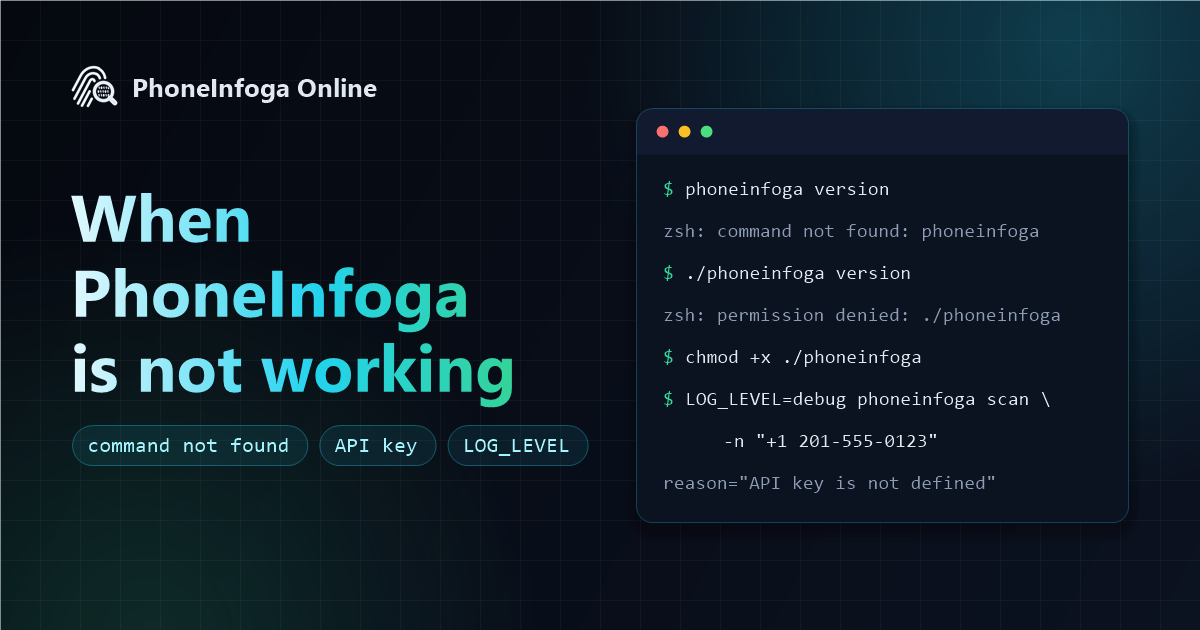
PhoneInfoga does not start: command not found, permission denied
These messages come from your system, before PhoneInfoga even runs. Look for yours in the first column:
| Message | Cause | Fix |
|---|---|---|
zsh: command not found: phoneinfoga, bash: phoneinfoga: command not found or phoneinfoga: command not found | The program is not in a folder of your PATH. A git clone or a Python tutorial does not install it. | Run ./phoneinfoga from its folder, or copy it with sudo install ./phoneinfoga /usr/local/bin/phoneinfoga. |
zsh: permission denied: ./phoneinfoga or bash: ./phoneinfoga: Permission denied | The file is not executable. | Run chmod +x ./phoneinfoga, or copy it with sudo install, which makes it executable. |
zsh: permission denied: phoneinfoga | Something named phoneinfoga in a PATH folder cannot run, such as a cloned folder moved to /usr/bin. | Check with ls -ld /usr/local/bin/phoneinfoga /usr/bin/phoneinfoga, then replace that folder with the real program. |
zsh: exec format error: ./phoneinfoga or cannot execute binary file: Exec format error | The archive is for another processor. | Take the archive that matches uname -m. |
The term 'phoneinfoga' is not recognized as the name of a cmdlet | Windows PowerShell does not start programs from the current folder by their name. | Type .\phoneinfoga.exe. |
The default shell of Kali and macOS is zsh, which explains the zsh: prefix. The install steps of each system, with the messages they can print, are in our guides for Windows, Ubuntu, Kali Linux and Termux on Android.
We checked this guide on November 26, 2026, against the v2.11.0 code, its documentation, the provider pages and the project's GitHub issues. We have not tested a real Numverify or Google key with v2.11.0, and the sentence before each output block says where it comes from.
Which PhoneInfoga scanners need an API key?
A scan runs five scanners. Two of them need API keys, and a scanner without its key is skipped without a message:
| Scanner | What it adds | Key | Limits |
|---|---|---|---|
local | The formats of the number, its country and, when known, its carrier, from offline data | None | None |
numverify | Validity, location, carrier and line type | NUMVERIFY_API_KEY | 100 requests a month on the free plan |
googlesearch | 45 Google search links to open yourself | None | None, since it never contacts Google |
ovh | Number range, city and zip code from OVH Telecom | None | Runs for five countries and can only match French and Swiss numbers |
googlecse | Pages found through Google Custom Search | GOOGLECSE_CX and GOOGLE_API_KEY | Closed to new customers, ends on January 1, 2027 |
Without any key, a scan of a valid number still runs local and googlesearch, and its last line reads 2 scanner(s) succeeded. That is normal, not an error.
Why PhoneInfoga says “API key is not defined”
This reason appears in the debug log when numverify finds no key. Run the scan with LOG_LEVEL=debug to see it, along with the reason for every other skipped scanner. In PowerShell, type $env:LOG_LEVEL = "debug" on its own line first.
LOG_LEVEL=debug phoneinfoga scan -n "+1 201-555-0123" -D googlesearchThe line for numverify ends with reason="API key is not defined" scanner=numverify, and the one for googlecse with reason="search engine ID and/or API key is not defined". Once the key is read, the line goes away and the scanner runs. If it stays, look for one of these causes:
- The
.envfile is in another folder. Runphoneinfogafrom the folder that holds it, or point to it with--env-file. - The name of the variable has a typo or the wrong case.
NUMVERIFY_API_KEYis all capitals, with underscores. - In the shell, spaces around
=turn the line into another command, and a variable set in one terminal window does not exist in the others. - A variable of the same name is set in the shell, even an empty one, and hides the value of
.env. Remove it withunset NUMVERIFY_API_KEY, orRemove-Item Env:NUMVERIFY_API_KEYin PowerShell. - On Windows, the
.envfile was saved in UTF-16, as our Windows guide explains. - PhoneInfoga runs in Docker, where the container cannot see your
.envfile. Pass the key with-e, as shown in the next section.
LOG_LEVEL itself has no effect in a .env file, because PhoneInfoga reads it before it loads that file.
How to set PhoneInfoga API keys in a .env file
PhoneInfoga loads a file named .env from the folder you run it from, not from the folder of the program. Each line holds one variable:
NUMVERIFY_API_KEY=YOUR_KEY
GOOGLECSE_CX=YOUR_SEARCH_ENGINE_ID
GOOGLE_API_KEY=YOUR_GOOGLE_KEY
Replace each value with your own and leave out the lines you do not need. Quotes around a value make no difference, and a line may start with export. On Linux and macOS, this line creates the file with your Numverify key, or replaces it:
echo 'NUMVERIFY_API_KEY=YOUR_KEY' > .envTo use another file, add --env-file=.env.local to the scan. You can also set a key for one command, or for the rest of the terminal session with export, leaving no spaces around =:
NUMVERIFY_API_KEY=YOUR_KEY phoneinfoga scan -n "+1 201-555-0123"
export NUMVERIFY_API_KEY=YOUR_KEY
The official documentation writes NUMVERIFY_API_KEY=<key>, which you cannot paste as it is, because the shell reads < and > as redirections. On Windows, the commands differ: see the keys section of our Windows guide.
Keys with Docker and phoneinfoga serve
In Docker, pass each key with -e, or a whole file with Docker's --env-file option, before the name of the image. We wrote these lines from the image's settings and have not run them:
docker run --rm -it -e NUMVERIFY_API_KEY=YOUR_KEY sundowndev/phoneinfoga scan -n "+1 201-555-0123"
docker run --rm -it --env-file .env sundowndev/phoneinfoga scan -n "+1 201-555-0123"
In a Docker Compose file, write the values without quotes: in issue #1082, quotes in the environment list broke a Numverify key. With phoneinfoga serve, the web page has no field for keys. The server takes them from its environment, or from the .env file of the folder you start it from.
Numverify says “Invalid authentication credentials”
When the Numverify API refuses a key, the scan ends with numverify: Invalid authentication credentials under The following scanners returned errors:. The other scanners still run.
In v2.11.0, the numverify scanner calls https://api.apilayer.com/number_verification/validate, the address of the former APILayer marketplace, and sends the key in a header. Users with keys from numverify.com report that very error, in GitHub issues #1344 and #1458. In 2022 and 2023, the maintainer advised a key for the “Number Verification API” from an apilayer.com account instead.
Since July 2026, the sign-up buttons of that marketplace page lead to the new APILayer Suite, whose documentation gives another address for its keys. We have not tested a key from either sign-up with v2.11.0, so try yours with a first scan before you rely on it. Another error reported by users, numverify: You cannot consume this service in issue #1259, has no confirmed cause.
Numverify's free plan allows 100 requests a month, and each scan uses one. If the output of a scan has a Results for numverify block, the API accepted your key.
googlecse: the Google Custom Search API is closing
The googlecse scanner uses Google's Custom Search JSON API. Google no longer accepts new customers for it, and existing customers have until January 1, 2027 to move to another product. If you do not already have a key and a search engine, you can no longer set up this scanner.
If you do have them, set both variables. GOOGLECSE_CX takes the bare ID of the search engine, not its address: a URL there gave googleapi: Error 400: Request contains an invalid argument., badRequest in issue #1189.
GOOGLECSE_CX=YOUR_SEARCH_ENGINE_ID
GOOGLE_API_KEY=YOUR_GOOGLE_KEY
GOOGLECSE_MAX_RESULTS=10
GOOGLECSE_MAX_RESULTS is optional, with 10 results by default and 100 at most. Each scan sends two queries. Until the API ends, Google allows 100 free queries a day, then charges $5 per 1,000 queries, up to 10,000 a day. Past the quota, the scanner fails with rate limit exceeded.
Errors of the scanners without a key: ovh and googlesearch
The ovh scanner asks the OVH Telecom API about the number range, and it never needs an API key. It only runs for numbers from France, Belgium, the United Kingdom, Spain and Switzerland, and in v2.11.0 it can only match French and Swiss numbers. A Belgian or UK number always gets Found: false, and a Spanish one ends with ovh: [country] Given data (es) does not belong to the NumberCountryEnum enumeration, since the OVH API no longer accepts Spain. Add -D ovh to the command to leave it out.
The googlesearch scanner only writes 45 Google searches for the number and never contacts Google itself, so it cannot get you blocked, and you need no proxy or VPN for it. Users have reported links that open blank pages (issue #1426) or searches with no result (issue #1457). These are plain Google searches, so what each one shows depends on Google at that moment.
Errors about the phone number
These messages mean that PhoneInfoga could not read the number you typed:
| Message | Cause | Fix |
|---|---|---|
given phone number is not valid | The number holds letters, or a placeholder such as +4176418xxxx. | Type digits only, country code first. |
invalid country code | The number is in national format, with its leading 0. | Start with the country code, as in +1 201-555-0123. |
Error: unknown command "201-555-0123" for "phoneinfoga scan" | The number has spaces and no quotes. | Put it in quotes: -n "+1 201-555-0123". |
Error: unknown shorthand flag: 'n' in -n | The scan command is missing. | Type phoneinfoga scan -n. |
No error, but the wrong country, such as Country: EG | The country code is missing, so the first digits were read as another one. | Add the country code. |
Our commands tutorial shows the number formats that work.
Is there a PhoneInfoga config file?
No. Version 2 reads its settings from environment variables only, and the .env file is just a way to set them. The config.py file that older tutorials mention belonged to version 1, the Python script that version 2 replaced in March 2020. When that file was missing, version 1 stopped with The config file does not exist. Please create it., and it kept the Google key in a google_api_key variable.
Errors such as ModuleNotFoundError: No module named 'config' or NameError: name 'google_api_key' is not defined therefore come from that old Python code, and so does a missing requirements.txt. Version 2.11.0 contains no Python file. Install the current release with our guide for Windows, Ubuntu or Kali Linux, and see why 2020 and 2022 tutorials fail for the other Python errors.